Posts

MFC: How to limit application instance or not allow multiple instance of the same application

1. Create the class #ifndef LimitSingleInstance_H #define LimitSingleInstance_H #include&LTwindows.h&GT //This code is from Q243953 in case you lose the article and wonder //where this code came from. class CLimitSingleInstance { protected:   DWORD  m_dwLastError;   HANDLE m_hMutex; public:   CLimitSingleInstance(TCHAR *strMutexName)   {     //Make sure that you use a name that is unique for this application otherwise     //two apps may think they are the same if they are using same name for     //3rd parm to CreateMutex     m_hMutex = CreateMutex(NULL, FALSE, strMutexName); //do early     m_dwLastError = GetLastError(); //save for use later...   }     ~CLimitSingleInstance()   {     if (m_hMutex)  //Do not forget to close handles.     {        CloseHandle(m_hMutex); //Do as late as possible.       ...
How To Code Inheritance and Polymorphism in C

C++ Code -------------- #include &ltiostream&gt #include &ltcstdlib&gt using namespace std; class base { public:     base();     virtual ~base();     virtual void draw();     void initialize(); private:     int value; }; base::base() {     cout << "base\n"; } base::~base(){     cout << "~base\n"; } void base::draw(){     cout << "base draw\n"; } void base::initialize() {     cout << "initialize\n"; } class child : public base { public:     child();     ~child();     virtual void draw(); private:     int number; }; child::child(){     cout << "child\n"; } child::~child() {     cout << "~child\n"; } void child::draw() {     cout << " child draw\n"; } int main(in...

How To Setup NetBeans in C/C++

If you have Visual Studio from Microsoft well great but if you're not fortunate to have the commercial tool you have NetBeans which can run in both MS Windows and Linux. So, to setup NetBeans you need the following, - Download and install NetBeans with C/C++ support - Download and install MingW - Download and install MSys inside the base directory of MingW - Point the environment variables "path" to where the /bin of MingW and MSys - Run NetBeans and go to \Tools\Options\C++ and add in the tool chain the base directory of MingW - For the C compiler point the path to C:\Program Files (x86)\mingw-w64\i686-5.1.0-posix-dwarf-rt_v4-rev0\mingw32\bin\i686-w64-mingw32-gcc.exe - For the C++ compiler point the path to C:\Program Files (x86)\mingw-w64\i686-5.1.0-posix-dwarf-rt_v4-rev0\mingw32\bin\i686-w64-mingw32-c++.exe - For the debugger point the path to C:\Program Files (x86)\mingw-w64\i686-5.1.0-posix-dwarf-rt_v4-rev0\mingw32\bin\gdb.exe - For the make point the path...

How to setup Visual Studio 2008 to publish ASP.NET website to IIS 7.0 in Windows Server 2008

Image
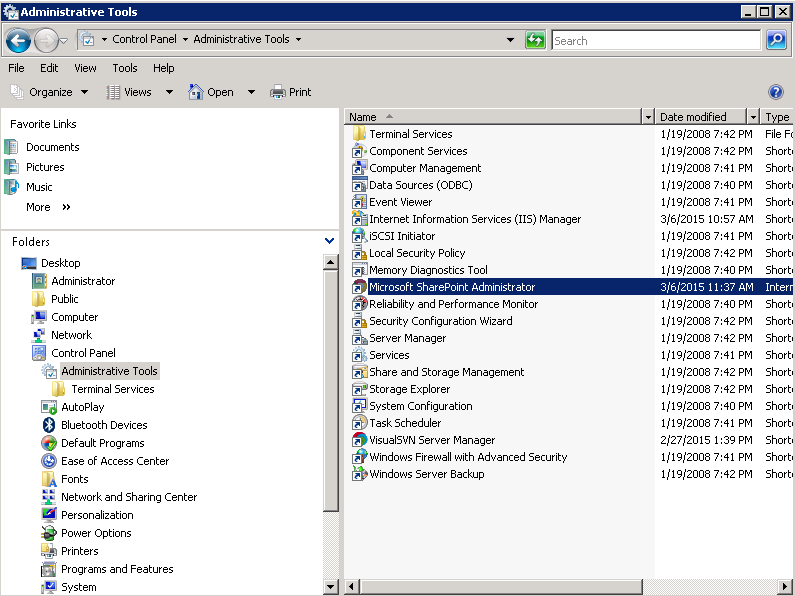
1. Download and install FrontPage Extension for IIS 7.0  into Windows Server 2008 2. Download and install the .NET 3.5 into the Windows Server 2008 3. Go to Windows Server 2008 "Control Panel","Administrative Tools","Microsoft SharePoint Administrator" and select "Extend"

C++: Type Conversions

typedef std::wstring XSTRING; void Convert(LPCTSTR input, XSTRING &output) { output = input; } void Convert(int input, XSTRING &output) { output = L""; std::wostringstream ws; ws << input; output = XSTRING(ws.str()); } void Convert(unsigned int input, XSTRING &output) { output = L""; std::wostringstream ws; ws << input; output = XSTRING(ws.str()); } void Convert(unsigned long input, XSTRING &output) { output = L""; std::wostringstream ws; ws << input; output = XSTRING(ws.str()); } void Convert(std::string input, XSTRING &output) { output = L""; output = XSTRING(input.begin(), input.end()); } void Convert(XSTRING input, std::string &output) { output = ""; output = std::string(input.begin(), input.end()); } void Convert(char* input, XSTRING &output) { output = L""; output = XSTRING(input, input + strlen(input)); ...

Visual Studio 2008 MFC: How to embed a dialog to a dialog

Image
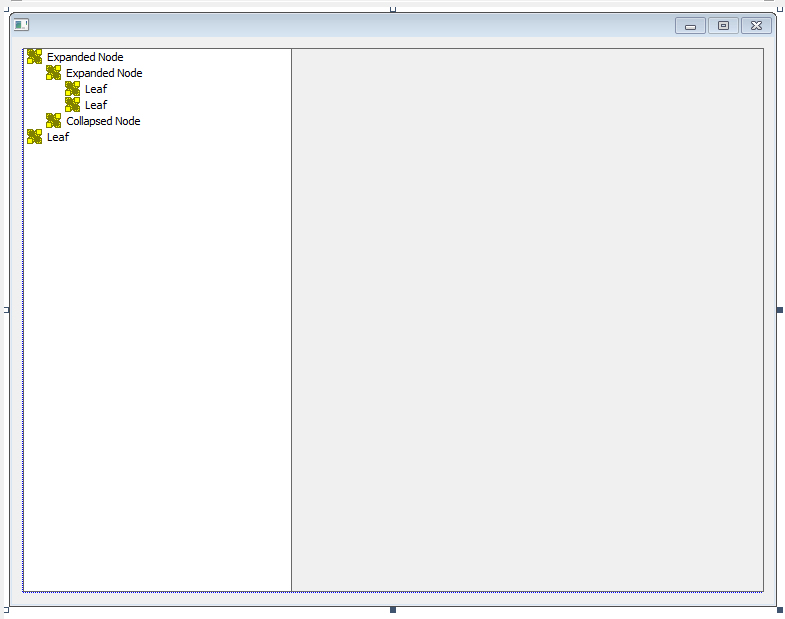
I wanted to create a dialog based application that a user can select an item from the left and displays different dialog to the right. I drag and drop a picture control into the left side that will serve as container of the child dialog. Then, I created also a child dialog with button in the resource as, Right-click the child dialog and select properties. The following properties should be as, Border = None Style = Child System Menu = False Title Bar = False Visible = True I selected the child dialog and right-click to create a class as, After creating the class, add the code below in the constructor and first argument is your class name. Create(YourClassName::IDD,pParent); Then, to dynamically add the child dialog to the picture control in our main dialog you can do it as, m_pYourClassName = new YourClassName(this); CRect rc; GetDlgItem(IDC_STATIC_DEVICE)->GetWindowRect(rc); ScreenToClient(&rc); m_pYourClassName->MoveWi...

Linux mount error when previously okay

Image
I've encountered an error when mounting in my Linux box. Previously it was okay but somehow now it didn't. To fix all I did is restart the service where the "//XXX.XXX.XXX.XXX/Share"  is located as below, That's it!

How to call Java code from C/C++

Image
I wanted to call Java functions from C++ and searching in the internet I found some codes but seems lacking more details. What I will do here is to make it complete. CALLING JAVA IN C++ USING MS VISUAL STUDIO 2008 Requirements: -JDK ( I used jdk1.7.0_55 32bit)  -Visual Studio 2008 Procedure: 1. Add the library "jvm.lib". Remember this library exist when you install the JDK 2. Add the 2 path of the include files of the JDK 3. Add the library path 4. Create the Java source and compile them (javac * to compile everything in the folder). The source location in my MS Windows environment is D:\MyFiles\Downloads\Java Src\TestStruct //HelloWorld.java public class HelloWorld {       public static void main(String args[])       {          System.out.println("Hello World!");          System.out.println("This is the ma...

How to implement mouse drag using wxWidgets

I have an application without borders so I cannot move the application. This application has a wxPanel so the only way I can click and drag is thru the wxPanel. How to implement mouse drag? class myFrame : public wxFrame { public: myFrame(const wxString& title, wxWindow *parent=NULL); wxWindow* parent; private: wxDECLARE_EVENT_TABLE(); } class myPanel : public wxPanel { public: myPanel (wxWindow* parent)     { this->parent = parent; dragging=false; x=0,y=0;               Create(parent, wxID_ANY,wxDefaultPosition, *new wxSize(100,100));     } void onMouseDown(wxMouseEvent& evt) { CaptureMouse(); x = evt.GetX(); y = evt.GetY(); dragging=true; } void onMouseUp(wxMouseEvent& evt) { ReleaseMouse(); dragging=false; } void onMove(wxMouseEvent& evt) { if(dragging) { wxPoint mouseOnScreen = wxGe...

How to put an image to wxPanel using wxWidgets

Image
1. I created the class xOsdHeaderPanel 2. Must call the function wxInitAllImageHandlers(); 3. Create a wxBitmap object and call SetBackgroundBitmap(..) class xOsdHeaderPanel : public wxCustomBackgroundWindow<wxPanel> { public: xOsdHeaderPanel(wxWindow* parent)     { wxInitAllImageHandlers(); const wxSize xxsize(733,80);         Create(parent, wxID_ANY,wxDefaultPosition,xxsize); wxBitmap bitmap(*new wxImage(wxT("./Header.png"),wxBITMAP_TYPE_PNG)); SetBackgroundBitmap(bitmap); new wxButton(this,wxID_ANY,wxT("Sample Button"));     } }; Result:

How to build Boost in Windows and Linux

============ WIN7 ============ Prerequisites -------------- -  Visual Studio 2008 Professional with SP3 Build Steps -------------- 1. Unzipped boost_1_55_0.zip 2. Execute \boost_1_55_0\bootstrap.bat 3. Use the following command to generate files of release    bjam toolset=msvc-9.0 variant=release threading=multi link=shared define=_BIND_TO_CURRENT_VCLIBS_VERSION 4. The binaries can be found in \boost_1_55_0\bin.v2 ============= SLEPOS11SP3 ============= Prerequisites -------------- - GCC 4.3.4 - Linux 3.0.93 Build Steps ------------- 1. Unzipped boost_1_55_0.zip 2. Execute ./bootstrap.sh --with-libraries=all --with-icu --prefix=/usr/local/boost 3. Execute ./b2 variant=release toolset=gcc link=shared threading=multi runtime-link=shared install 4. The files can be found in \usr\local\boost That's it!

How to build Xerces-c in Windows and Linux

================= MS Windows (Win7) ================= Prerequisite: - Visual Studio 2008 SP3 - xerces-c-3.1.1.zip Build Steps: 1. Unzipped xerces-c-3.1.1.zip 2. Open the solution in VS 2008 \xerces\xerces-c-3.1.1\projects\Win32\VC9\xerces-all\xerces-all.sln 3. Build the projects in "Release" mode 4. The binaries can be found in \xerces\xerces-c-3.1.1\Build\Win32\VC9\Release =========== Linux (Suse) =========== prerequisites -------------- - GCC 4.3.4 - Linux 3.0.93 xerces -------- 1. Unzipped xerces-c-3.1.1.zip in \usr\local 2. Create another folder (any folder name but in this example it's "xerces") 3. Choose current directory "xerces" and call "../xerces-c3.1.1/configure 4. Choose current directory "xerces" and call "make build" 5. Choose current directory "xerces" and call "make install" 6. The libraries can be found in \usr\local\lib 7. The b...

How to display all environment variables and its values (C/C++)

#include<stdio.h> int main(int argc, char* argv[], char* env[]) {     int i=0;     while(env[i])     {         printf("%s\n",env[i]);         i++;     }     return 0; }

How to statically link applications to wxWidgets via Visual Studio 2008 and in Linux

Image
MS Windows Procedure: Build the wxWidgets as static   Uncompressed the source file “wxWidgets-2.8.12.tar.gz” Go to “..\wxWidgets-2.8.12\build\msw”  Right-click and open the file “wx.dsw” using Visual Studio 2008 Change the “Runtime Library” property value into “Multi-threaded (/MT)” Rebuild the solution as “Release” mode The libraries can be found in “..\wxWidgets-2.8.12\lib\vc_lib” Build the application to link with wxWidgets as static A dd e nvironment variable (for convinience) WX WIN and set the value to wherever your wxWidgets is located. Sample: c:\wxWidgets Open your application in Visual Studio 2008 and s witch the mode to “Release” “Preprocessor Definitions” must be set to: WIN32 __WXMSW__ _WINDOWS NOPCH _CRT_NONSTDC_NO_DEPRECATE            4. Change the “Runtime Library” property value into “Multi-threaded (/MT)” ...